Home Wi-Fi Technician and Access Point Installation in Kuwait
UltraTech Kuwait sends a Wi-Fi and network technician to homes in every area of Kuwait to end weak signal and dead rooms, by installing a wired access point on each floor, all under one Wi-Fi name. A villa usually needs one access point per floor and two on a large floor, each on its own cable. Mesh is only for the spot no cable can reach.
Home technical visits: Site visits are free in most areas of Kuwait. Distant areas have a location-based fee; select your area to see the exact fee before booking. Any paid visit fee is deducted from your final invoice if you go ahead with us.
Reviewed by Eng. M. Ahmed, Team Leader, Network & Project Specialist
Last updated:
- A wired access point on each floor
- One Wi-Fi name for the house
- Villas, houses and flats
- All areas of Kuwait
01
Does my home need access points?
Fast downstairs, weak upstairs. Floors are reinforced concrete, and each slab the signal crosses takes most of its strength.
Rooms with no Wi-Fi. One router cannot cover a Kuwaiti house with floors and a basement.
You have extenders or mesh. They show full bars and a low speed, because they repeat a weak signal.
A different Wi-Fi name on each floor. The phone holds on to the far network instead of moving.
The technician measures the signal in every room and confirms the count before any work.
02
How many access points your home needs
Start at one access point per floor, two on a large floor, and one for each separate apartment.
| Home | Access points |
|---|---|
| Flat or single floor | 1 |
| Two-floor house | 2 |
| Villa: basement and three floors | 4 |
| The same villa with large floors | 8 |
| The same villa with a roof annex and garden | 5 + 1 outdoor |
Closed rooms and thick walls add more: our finished villas have 7 to 14.
Count it for your home
Your Wi-Fi
One Wi-Fi name, every access point on its own cable.
- 4 indoor access points
- 4 cable runs back to the switch
- PoE switch: 8 portsPowers every access point through its cable
- Closed rooms and thick walls can add access points; the technician checks by measuring.
A starting point with no prices: the technician confirms it at the visit.
03
Numbers and standards
From our published jobs and industry standards; sources at the end of the page.
7 – 14
Access points in the villas we finished and published (Al-Masayel, Al-Siddiq, Abu Fatira, Sabah Al-Ahmad)
Wi-Fi 6
More capacity in homes with many devices, using OFDMA and multi-user MIMO, according to the Wi-Fi Alliance 1
PoE
Power and data on the same cable, to IEEE 802.3at and 802.3bt 2,3
99.0%
Internet adoption in Kuwait at the end of 2025, per DataReportal 5
04
What we install
Ceiling or wall access pointsAt least one per floor, placed to cover the rooms.
A cable to each oneCat6 carries the full speed and the power.
One PoE switchPowers every access point from the cabinet.
Router set-upOnly one device hands out addresses, so nothing clashes.
One network namePhones move between floors without dropping.
An app on your phoneSee the network and devices from anywhere.
05
What happens on the visit
- 1
Call, WhatsApp or bookTell us the area, the floors and the problem. Booking shows your area's visit fee.
- 2
Signal check in every roomWe look at the router, the cabinet and any extenders.
- 3
Plan and quotationThe number and position of access points and the cable routes.
- 4
Cabling and installationOn one PoE switch. Delivery and installation start within 2–3 days after the 50% advance is cleared. Project completion time depends on the scope and requirements.
- 5
Test and handoverWe test speed in every room, label the cables and set up the app.
06
Home Wi-Fi jobs we have finished
Five homes in Kuwait, each published with what we found and what we installed.
- Finished job
Abu Fatira: three floors and a basement
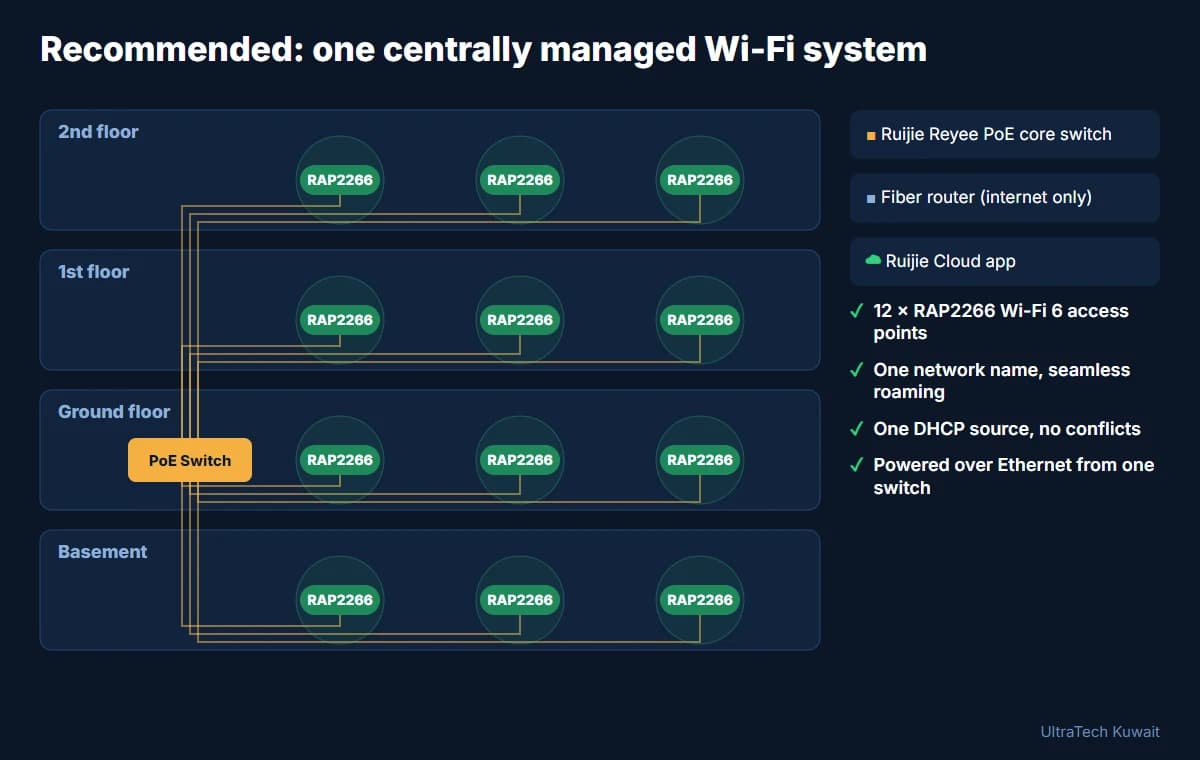
The whole network went down after a new fibre router was connected. We brought it back on the first visit, then fitted 12 Ruijie Wi-Fi 6 access points.
- Finished job
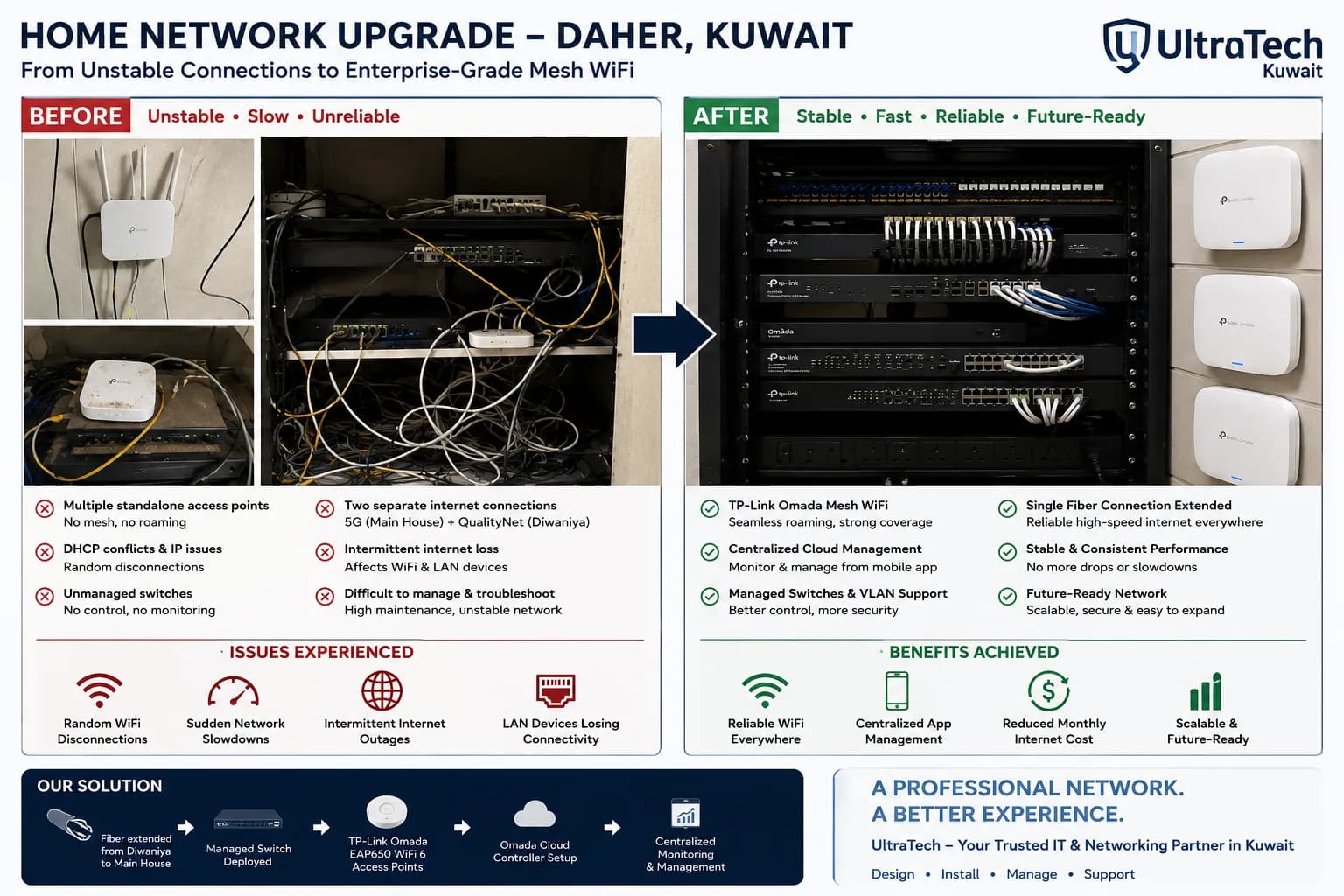
Daher: main house and diwaniya
Constant drops across seven or eight standalone access points. Rebuilt on TP-Link Omada with a wired link between the two buildings.
- Finished job
Al-Masayel: eight wall access points
Eight Ruijie Wi-Fi 6 wall-plate access points on one cloud-managed network.
- Finished job
Sabah Al-Ahmad: villa before plaster
Cabled to our plan during construction, then fitted with 14 Wi-Fi 6 access points, cameras and an intercom.
- Finished job
Al-Siddiq: villa in final finishing
Seven Wi-Fi 6 wall access points, five outdoor cameras and a two-door intercom.
07
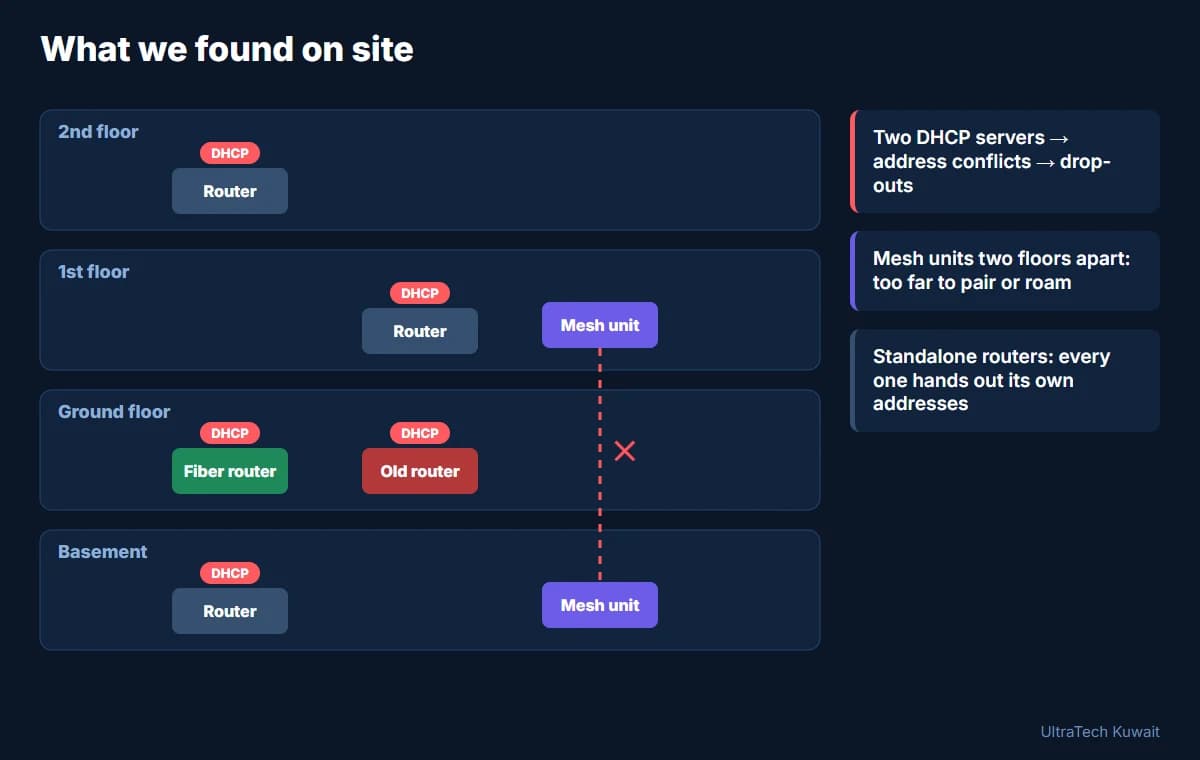
Case study: the Abu Fatira villa
Three floors and a basement. What we found, and the design we recommended.
08
Mesh or wired access points?
| Aspect | Mesh and extenders | Wired access points |
|---|---|---|
| Link between units | Wireless | A cable to each unit |
| Speed on the far floor | Drops with each hop | Full |
| A concrete slab between two units | May not pair at all | No effect |
| Best for | A small flat, or a spot with no cable | Villas and houses with floors |
We use mesh only for a spot no cable can reach.
09
Installation prices
Installation is charged per point; the equipment is priced per product.
| Work | Installation, per point |
|---|---|
| Wi-Fi access point | 5–25 KWD |
| Cable run, per point | 10–20 KWD |
| Network switch configuration | 10–50 KWD |
Hardware warranty 1 year; our installation work 1–3 months. Quote requests are reviewed by a person and answered within 4-8 working hours.
10
Technical detail
For the technically minded. Folded so the page stays short.
Cabling a finished house
- We pull cable through existing conduits: old phone, satellite and intercom points, above false ceilings and down service shafts.
- Slim surface trunking only where there is no hidden route; any cut in a wall is agreed with you first.
A new villa, before plaster
- We mark every access point and camera on your floor plans; your electrician runs conduit and Cat6 while the walls are open.
- We fit and configure the equipment when the house is finished.
Bands and generations
- We install Wi-Fi 6 as standard: more capacity for many devices, using OFDMA and multi-user MIMO 1.
- We set access points up on 2.4 and 5 GHz, which every device in the house supports.
With a fibre or 5G router
- The access points work behind any router; we set it so only one device hands out addresses.
- If the 5G signal itself is weak indoors, insulated glass and walls are weakening it 4, and the fix is an outdoor 5G unit.
11
Frequently asked questions
- Why is the Wi-Fi weak upstairs or in some rooms?
- Because one router cannot cover a Kuwaiti house: floors are reinforced concrete and walls are block, and each one the signal crosses takes most of its strength. UltraTech Kuwait fixes it with a wired access point on each floor.
- How many access points does my home need?
- One per floor to start: a flat needs 1, a two-floor house 2, and a villa with a basement and three floors 4. A large floor takes two.
- Is a mesh system or an extender enough?
- Sometimes, in a small single-floor flat. In a villa, mesh units talk to each other over Wi-Fi so each passes on a weaker signal; we use them only where no cable can reach.
- How much does home Wi-Fi installation cost in Kuwait?
- Installation is per point: 5–25 KWD per access point and 10–20 KWD per cable run, with equipment priced per product. Home technical visits: Site visits are free in most areas of Kuwait. Distant areas have a location-based fee; select your area to see the exact fee before booking. Any paid visit fee is deducted from your final invoice if you go ahead with us.
- Can you cable a finished house without breaking walls?
- In most houses, yes: through existing conduits, above false ceilings and down service shafts. Any cut in a wall is agreed with you first.
- What warranty comes with the installation?
- Every product carries a 1-year hardware warranty, and our installation work is covered for 1–3 months, depending on the project.
- Which areas of Kuwait do you cover?
- All areas, in every governorate: Capital, Hawalli, Farwaniya, Mubarak Al-Kabeer, Ahmadi and Jahra.
- Will it work with my fibre or 5G router?
- Yes. The access points connect behind whichever router brings the internet in, and we set it so only one device hands out addresses.
Related pages
Want Wi-Fi in every room?
Home technical visits: Site visits are free in most areas of Kuwait. Distant areas have a location-based fee; select your area to see the exact fee before booking. Any paid visit fee is deducted from your final invoice if you go ahead with us.
12
Sources
The standards and figures on this page come from these sources, opened on 15 November 2026.
- 1.Wi-Fi CERTIFIED 6Wi-Fi Alliance, accessed 15 Nov 2026
- 2.IEEE P802.3at DTE Power Enhancements Task Force (IEEE Std 802.3at-2009)IEEE 802.3 Ethernet Working Group, Sep 2009
- 3.IEEE P802.3bt DTE Power via MDI over 4-Pair Task Force (IEEE Std 802.3bt-2018)IEEE 802.3 Ethernet Working Group, 27 Sep 2018
- 4.Recommendation ITU-R P.2109-2: Prediction of building entry lossITU Radiocommunication Sector, Aug 2023
- 5.Digital 2026: KuwaitDataReportal (Kepios), Nov 2025
Setting up a network for an office rather than a home? See office LAN installation for companies.