Home network cabling, switches and PoE in Kuwait
Which cable, how many points, what size of switch, and how one cable powers every access point and camera.
Reviewed by Eng. M. Ahmed, Team Leader, Network & Project SpecialistUpdated
A home network in Kuwait is Cat6 cable from one cabinet to every access point, camera, gate station and room, on a PoE switch that powers the devices through the same cable. A typical villa has 16 powered devices and needs a 24-port PoE+ switch with a PoE budget of about 250 W.
UltraTech Kuwait cables and installs home networks in all areas of Kuwait. The calculator below sizes the switch for your devices, and an engineer confirms it at a site visit.
A typical villa's switch
- 16
- Powered devices
- 155 W
- PoE load
- 250 W
- Minimum PoE budget
- 24 ports
- Switch
- 90 m
- Longest Cat6 run
5 access points, 6 cameras, 1 gate station and 4 IP phones.
Size your PoE switch
Enter what will plug into the switch. The figures are planning values by power class; the engineer checks the chosen models at the visit.
Your switch
Sized with a quarter of the power spare.
- 16 devices powered through the cable
- 155 W of PoE load
- 250 W minimum PoE budget
- PoE switch ports: 24Two ports spare for the router and the recorder
- The switch must be PoE+ (802.3at): access points and PTZ cameras need more than 15 W.
Planning figures, no prices: the engineer confirms the models at the site visit.
Cat6 or Cat6A for a house?
Cat6 is enough for almost every home: it carries 1 and 2.5 Gbps to 100 metres, and 10 Gbps up to about 55 metres. Cat6A is worth its extra cost only for long 10 Gbps links, such as between two cabinets.
We use solid copper cable, never copper-clad aluminium (CCA), which heats up and loses power on PoE.
How many network points should each room have?
At least one per room, and two behind the TV. Add one on the ceiling of each floor for the access point, one at every camera and gate position, and one where the 5G router or fibre box will sit. The final number is your choice.
Count your house's points with the villa network planner.
What is PoE, and why does a home switch need it?
PoE (Power over Ethernet) sends power down the network cable, so an access point on the ceiling or a camera on a wall needs no socket. Most access points need PoE+ (802.3at, up to 30 W a port); fixed cameras and phones run on plain PoE (802.3af, up to 15.4 W).
What size of switch does a villa need?
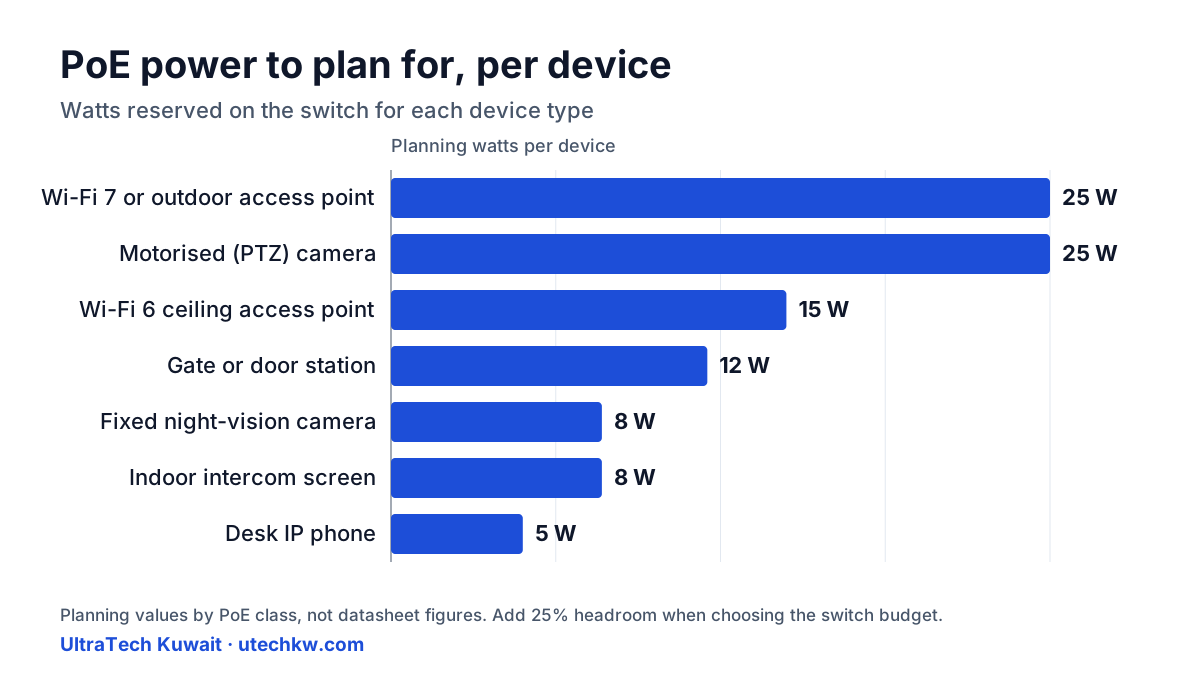
Count the devices powered through the cable, add two ports for the router and the recorder, and take the next size up: 8, 16, 24 or 48 ports. Then check the PoE budget, the total the switch can supply, and leave a quarter spare. 16 devices drawing 155 W need a 24-port switch with at least 250 W.
| Device | Planning watts |
|---|---|
| Wi-Fi 6 ceiling access point | 15 |
| Wi-Fi 7 or outdoor access point | 25 |
| Fixed camera with night vision | 8 |
| Motorised (PTZ) camera | 25 |
| Gate station | 12 |
| Indoor intercom screen | 8 |
| IP phone | 5 |
Managed or unmanaged switch at home?
Managed, when the home has cameras, guests, or an apartment for a married son or daughter: it keeps each on a network of its own (a VLAN), so a guest's phone or a hacked camera cannot reach the family's computers. An unmanaged switch is fine for a small flat with one network.
Can mesh Wi-Fi replace cabling?
Not in a concrete house. Mesh units talk to each other over Wi-Fi, and every slab or wall between them cuts the speed. Use mesh only where a cable cannot reach; where it can, cable the access point.
See home Wi-Fi setup.
Can a finished house be cabled without breaking walls?
Usually, yes. We use existing conduits (old phone and satellite points often have a route we can reuse), false ceilings, shafts, and slim trunking painted to match the wall. Where a wall has to be chased, we agree the route with you first.
What do you hand over after cabling?
Every cable labelled at both ends, a patch panel in the cabinet, a test result for each point, and a drawing that shows where each cable runs. The next technician, ours or anyone else's, can find a fault in minutes.
How much does home network cabling cost?
It depends on the number of points, the length of the routes, and whether the house is a shell or finished, so we don't price it before seeing it. Home technical visits: Site visits are free in most areas of Kuwait. Distant areas have a location-based fee; select your area to see the exact fee before booking. Any paid visit fee is deducted from your final invoice if you go ahead with us.
Quote requests are reviewed by a person and answered within 4-8 working hours.
The price per installed point and per switch is on installation prices and warranty.
Which switches do you install in homes?
TP-Link Omada as standard; Ruijie Reyee or Ubiquiti UniFi as premium. All three manage the switch and the access points from one app.
See Omada equipment, Reyee equipment and UniFi equipment.
What this is based on
The watt figures here are planning values by PoE class for each kind of device, not one model's specification, so the result has headroom on purpose. The engineer checks each chosen model's datasheet at the site visit. See our projects · Reviewed by Eng. M. Ahmed
Related
Want your house cabled properly?
Home technical visits: Site visits are free in most areas of Kuwait. Distant areas have a location-based fee; select your area to see the exact fee before booking. Any paid visit fee is deducted from your final invoice if you go ahead with us. Quote requests are reviewed by a person and answered within 4-8 working hours.